
The Task Board allows for the assigning and monitoring of tasks to indivduals team members in your clinic.
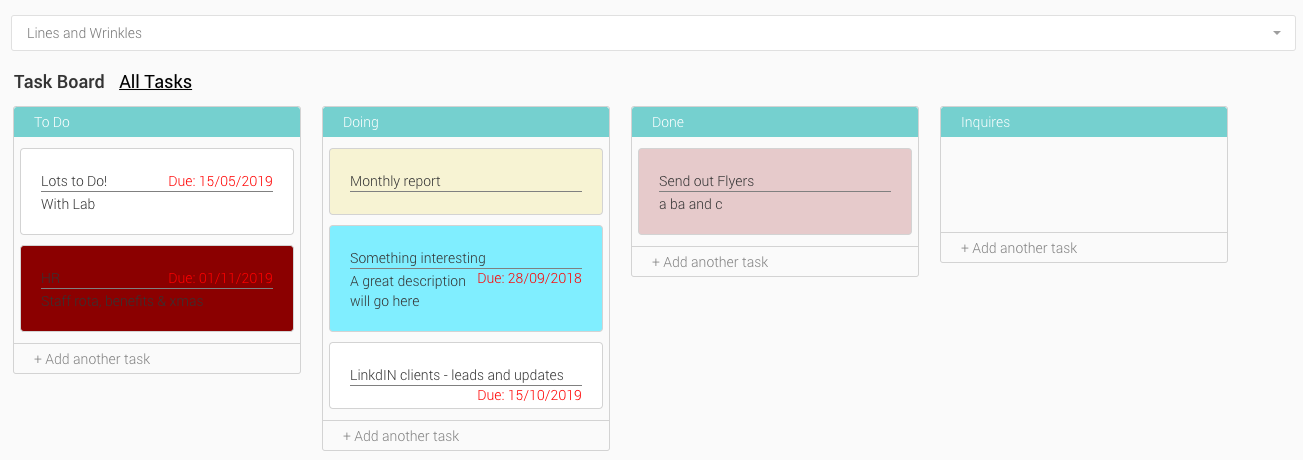
The Task Board can be found under the Dashboard. Three ‘boards’ are shown as standard, but up to five can be created. Tasks can be assigned to individuals, colour coded and have a due date set.
The Task Board
- On the Control Centre, open the menu drawer and select ‘Scheduling’ – ‘Task Board’
- To add additional boards, click the + button on the far right, and on the pop up window, name the board
- Boards can be deleted by hovering over the name of the board and selecting the trash can icon
- Add a task by selecting the appropriate ‘+Add another task’ button on the board you wish to add a task
- A pop up window will appear
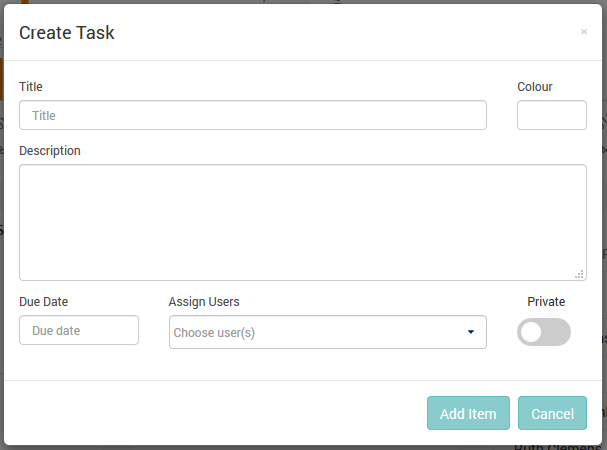
- Title Add a title to the task
- Colour Select an optional coulour for the card
- Description Describe the task in more detail if needed
- Due Date Assign a due dote to the task card
- Assign Users Assign the task to a team member. Tasks will appear on that users board.
- Private Mark the task as private
- Add Item Create the task
- Cancel Cancel the task creation
- Once a task card has been created, click on it to edit the details or delete
- You can drag and drop tasks between boards