
The Prepay Menu lists out all active and historic prepayments recorded against a patient.
An individual prepayment will display the treatment, quantity and cost assigned to it, as well as their current ‘remaining’ values.
Once a prepayment has been redeemed against an invoice, the invoices will be listed under ‘view invoices’.
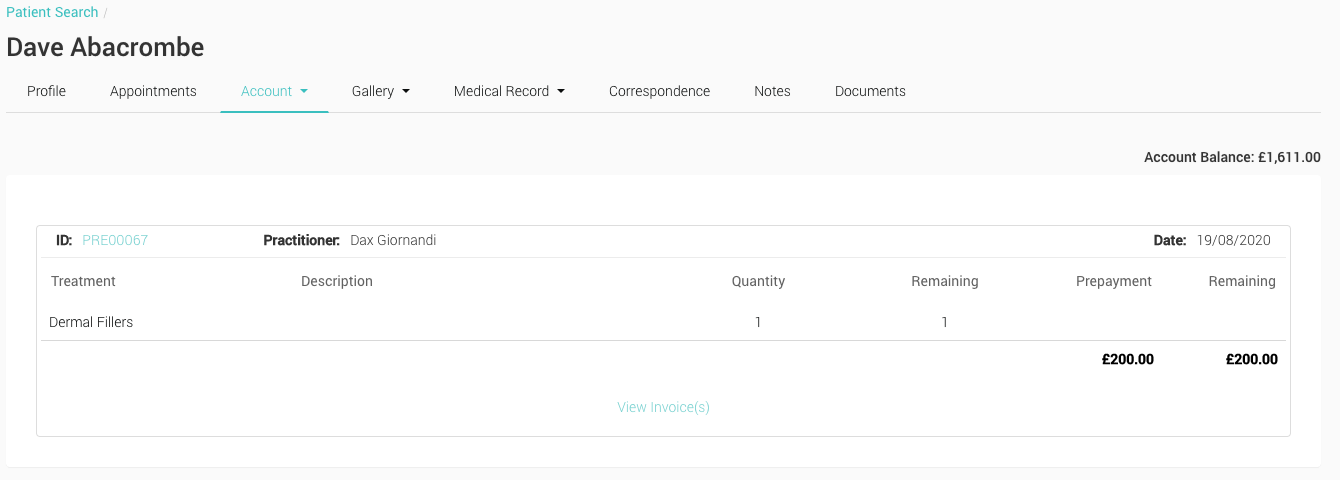
- Total Account Balance The remaining balance on the Patient’s prepayment account
- ID The individual Prepayment reference number. Clicking on this ID will load the original prepayment creation page
- Practitioner The practitioner assigned to the prepayment
- Treatment List of Treatments that this prepayment has been created for
- Description Optional additional description for the prepayment
- Quantity The amount of each treatment associated with this prepayment
- Remaining The remaining, unallocated number of treatments
- Prepayment The original amount of the prepayment
- Amount Remaining The remaining, unallocated £ amount
- View Invoice(s) Select to view any invoices that this prepayment has been allocated to, and the amounts allocated