
Allocating roles to your Team Members can limit or grant them access to Consentz features.
- From the bottom of the Control Centre menu draw, click the “Set Up” option
- Select “Team”
- A list of current Team Members will appear
- Select the team member whose role you wish to change
- Click the ‘Role’ drop down menu to select a role.
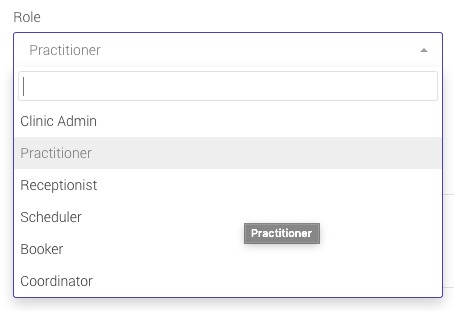
- Clinic Admin For your Clinic Manager, they have full access to the Clinic information
- Practitioner Allows access to the Practitioner app, and requires one license
- Receptionist Basic access to the Calendar, Patients records, Stock and Invoicing, reports
- Scheduler Very Basic access to the Calendar and Patient list only
- Booker Basic access to the Calendar, Patients records, Stock and Invoicing
- Coordinator Basic access to the Calendar, Patients records, Stock