
Patients are assigned to the clinic where they were created. However for Organisations with more than one clinic, it is possible to share patients between clinics. All patient records, including photos and notes can be shared with other clinics in the organisation. Financial information (Prepayments, Invoicing) will not be shared and remains specific to the clinic in which it was created.
Patient Sharing options are only visible to those organisations with more than one clinic.
Sharing All Patients across All Clincs

- On the Control Centre, log in as ‘Super Clinic Admin’ and select ‘Settings’
- Select ‘Profile’
- Approximately three quarters of the way down the page is the option ‘Share All Patients Across the Organisation’
- Click on the toggle switch to active the is ability
- Confirm your password and the process to share patients will begin
Share an Individual Patient
- Log into the Control Centre as an Admin
- Select ‘Patient’, navigate to and select the patient you which to share
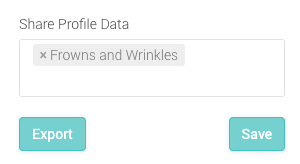
- On the top right of their profile, under ‘Share Profile Data’ select the names of the clinics you wish to share the patient with
Sharing Icons

- Orange Icon The Patient is being shared with other clinic, but originated from this clinic
- Green Icon The Patient is being shared with this clinic, but originated from another clinic