
This is an overview on how some of the pages under the “Set Up” Menu item relate to one another, and how to set up Treatments and Products to manage your stock.
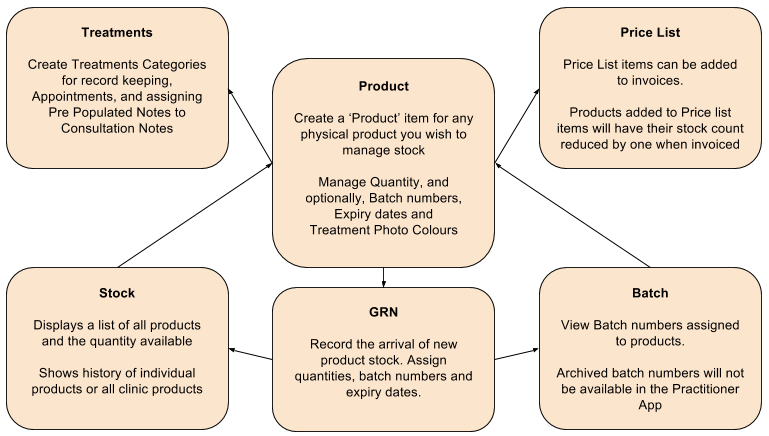
- Treatments Build a list of available Treatments and procedures that you wish to manage. Treatments can have any number of Products attached to them.
- Products Build a list of Products that you wish to manage and assign quantities and (optionally) batch numbers to. Batch numbers and Quantities can be recorded against a Product using the Goods Received Note (GRN) page.
- Goods Received Record new stock of products and assign both quantities and (optionally) batch numbers and expiry dates. Batch numbers and Quantities can be recorded against a Product and can be viewed on the Batch and Stockpages respectively.
- Stock Manage quantities of Product items. You can view all Products and see their movement history, as well as adjusting stock balance for any reason. All stock movements are recorded.
- Price List Build a list of your billable procedures and services to appear any Invoices you create. Adding Products to any Price List item will reduce their stock count by one when the Price List item is added to an invoice.