
The Prospects section of the Control Centre allows you to note down the details of prospective patients who can then be moved over to ‘Patients’ once they are ready to book an appointment. To record a Prospect you require only their name and telephone number.
- From the Control Centre menu drawer select the “Marketing” option.
- FSelect “Prospects”.
- A list of current Prospects information will be displayed.
- Click the “+” button to add a prospect.
- A new window will load.
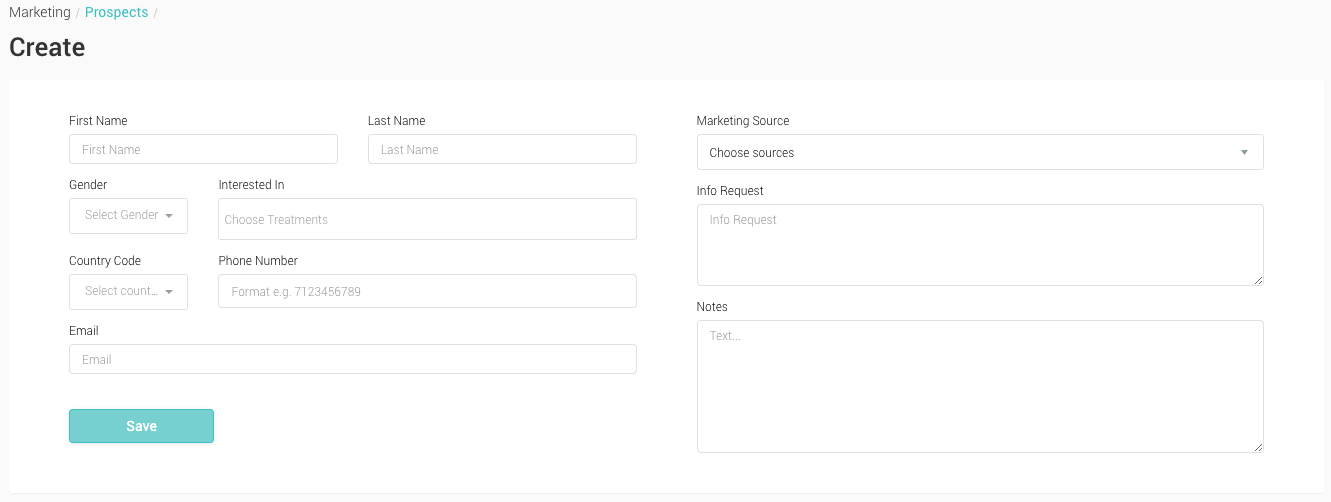
- First Name, Last Name The first and last name of a prospect, required
- Gender Select the gender of the prospect from the drop down
- Interested In Select from a list of Treatments from the drop down menu
- Phone Enter a contact phone number if known
- Email Enter a contact email address if known
- Info Request A note area to record any information a Prospect may request
- Notes A note section
- Enter the First and Last name of the Prospect.
- Enter a Telephone number, all other fields are optional.
- Click ‘Save’ to save the information to your ‘Prospects’.
- You’ll be returned to the previous page, where your can view this data in the list.
You can convert a Prospect to a Patient by editing a Prospect and clicking on the ‘Convert to Patient’ button at the bottom of the page.