
Any Prospect can then be converted to a Patient or archived if their information is no longer required.
- From the Control Centre menu drawer select the “Marketing” option.
- Select “Prospects”.
- A list of current Prospects information will be displayed.
- Click the “Edit” button to edit a prospect.
- The Prospect Information window will open.
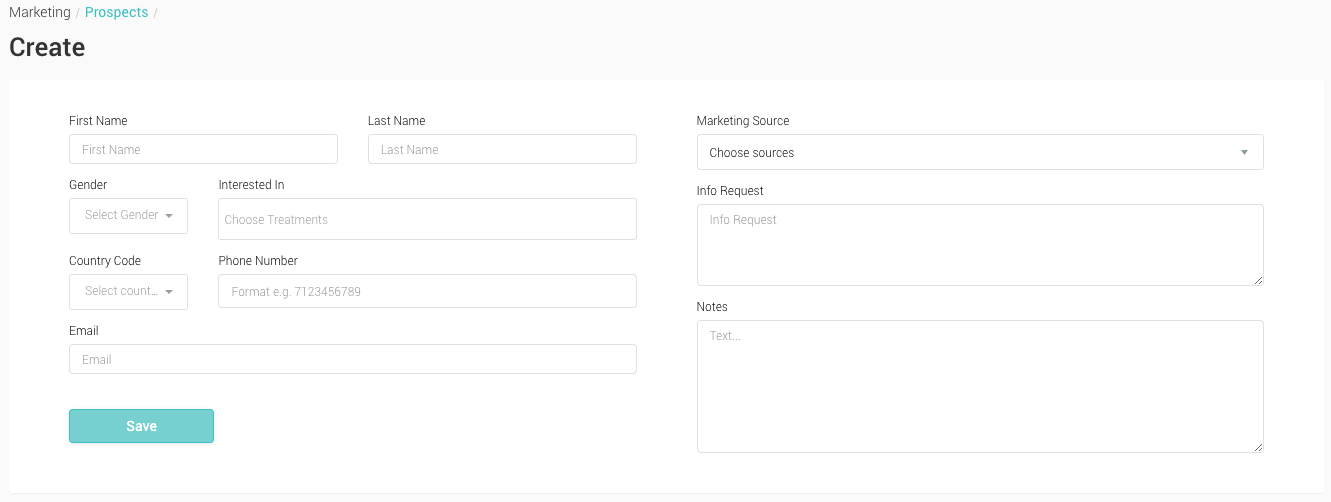
- First Name, Last Name The first and last name of a prospect
- Gender The gender of the prospect
- Interested In List of Treatments the Prospect is interested in
- Phone Prospect’s contact phone number
- Email Prospect’s email address
- Info Request Information the Prospect may have requested
- Notes Note section
- Check the information relating to the Prospect is correct.
- When all required changes have been made, click the ‘Convert to Patients’ button at the buttom of the page.
- The Prospect has now bee nadded to your patient list and is viewable from the ‘Patients’ menu.