
You can add your Clinic Details via the Control Centre. These details are displayed on the Patient Application, on Invoices and Messages sent from the Application.
- From the menu drawer select ‘Set Up’
- Choose ‘Profile’
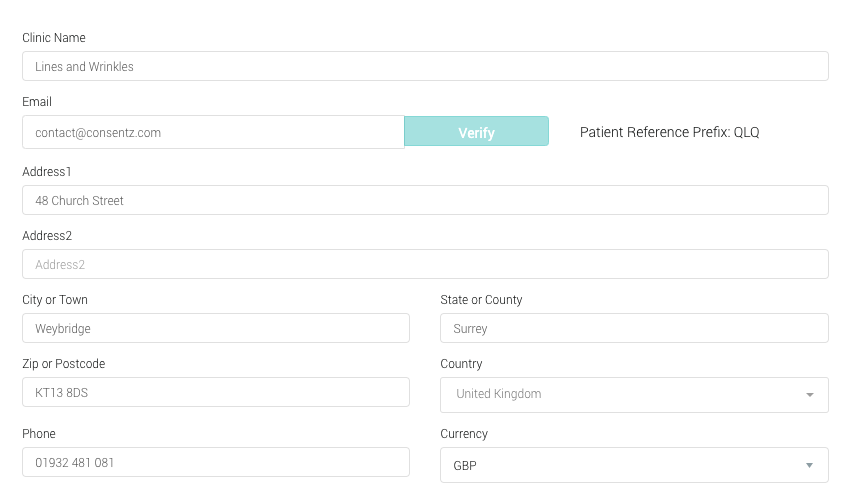
- Name Enter the name of your Clinic
- Email Enter the contact email of your Clinic
- Address Line 1 First line of your address
- Address Line 2 Additional line of address if needed
- City or Town Town or City name
- State or County County or State in which the Clinic is located
- CountrySelect your Country from the drop down
- Zip or Post Code Post Code or Zip Code
- Phone Enter your main telephone number
- Contact Name Enter the name of the main contact
- Website Enter your Clinic website address, including www.
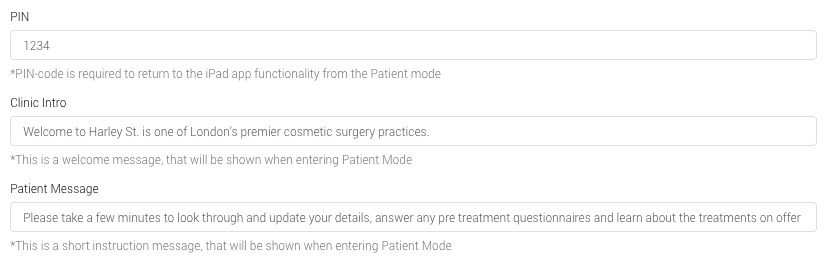
- PIN Enter the PIN for exiting ‘Patient Mode’ on the Practitioner Application
- Clinic Intro Enter introductory text for your Clinic. This will appear on the first page of the Patient Mode
- Welcome Message Enter a Welcome message for your patients. This will appear in Patient Mode, next to their names.
- Description Additional text to describe your clinic

- Create Customer Create an account with GoCardLess for direct debit payments
- Create Archive Download a backup of your clinic data
- Save Save all changes to this page
- Once you have entered the information, click ‘Save’ to complete the entry.
Clinic Details can be edited at any time.