
Memory Jogs can be created for an individual patient from the Consultation Tool on the Practitioner Application, under the menu item “Memory Jog”.
They allow you to note down points of interests, things you have in common and conversation starters that fall outside the scope of a consultation, but assist you in creating a bond with your patient.
- Enter the ‘Consultation Tool’ via the Calendar Appointment, or by selecting the Patient in the Patient List.
- Select ‘Memory Jog’ from the list on the left hand side of the screen.
- A list of existing Memory Jogs for that patient will appear in the main window.
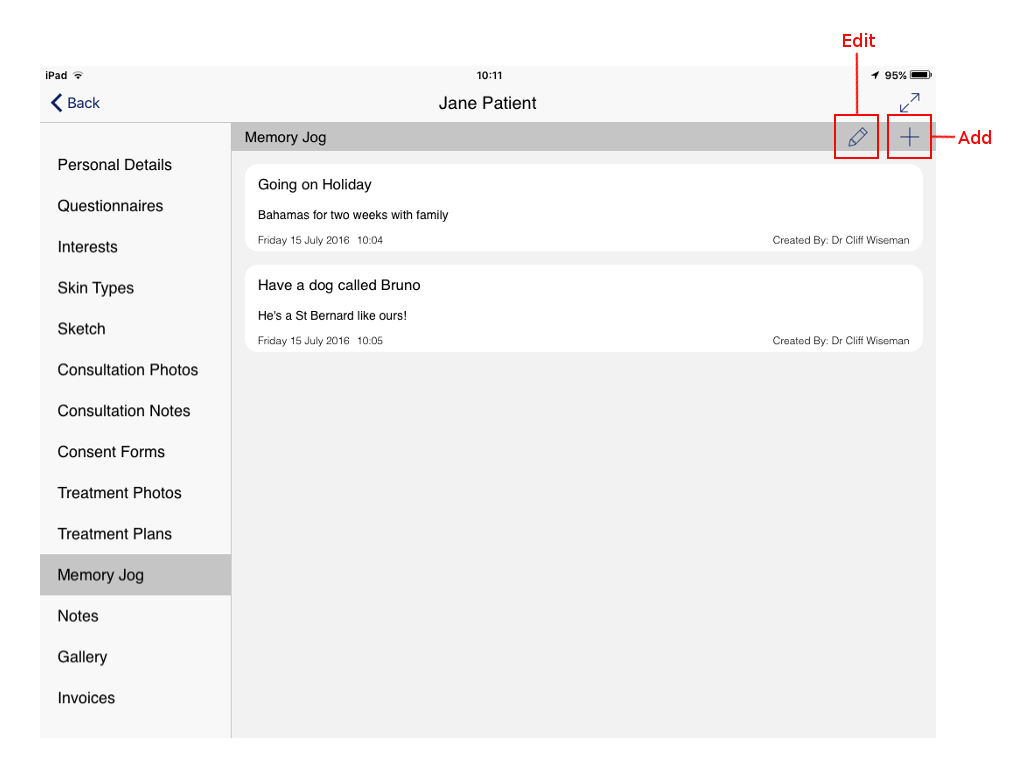
- Edit You can rename an existing Memory Jog by tapping this button.
- Add Tapping this button will create a new Memory Jog.
- Tap the “+” button to add a new Memory Jog.
- Use the keyboard to enter text for the Memory Jog.
- Upon completing the Memory Jog, tap the “Done” button at the top right of the screen.
- You can edit an existing Memory Jog by tapping the Edit button. Once the text boxes appear, tap the text you wish to edit, and the keyboard will appear allowing you to alter the existing text.
- Tap ‘Done’ when finished.

Memory Jogs are a great way to build patient relationships.