
Once you have created a Questionnaire, you can assign it to a Patient to complete next time they attend an appointment using the Practitioner Application. If you have yet to create a Questionnaire, search ‘How to build a questionnaire’ in the search bar.
Requesting your Patient to complete a Questionnaire is done via the ‘Patient Mode’
You can learn more about Patient Mode by searching ‘What is Patient Mode’.
- Upon entering the ‘Patient Mode’ you’ll be presented with the following screen, the ‘Questionnaire Chooser’:
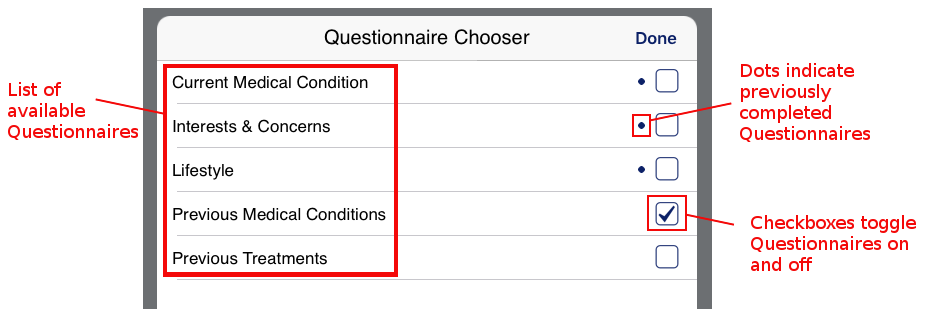
- Questionnaire List A list of all available Questionnaires
- Checkboxes Check the boxes of Questionnaires you want answered by the Patient
- Dot Dots appear next to Questionnaires that the Patient has completed previously
- Tap the checkboxes next to each of the Questionnaires you wish the Patient to answer
- Once satisfied, tap the ‘Done’.
- You can now hand the iPad to your Patient to carry on in Patient Mode.